What a detector sees in the home page video
Josep Castells, , 3 min read
Which part of the home page video is a real model, which part is precomputed and which part is an example.
The video on the home page is not an animation: underneath the interface layers there is an object detection model that analysed every shot. Here I explain how it is made, which part is real and which part is an example.
Six shots, nineteen and a half seconds
The video is a montage of six shots from Pexels, with hard cuts: a traffic intersection, a combine harvester, a port, a kitchen, some wind turbines and an echocardiogram. Three of them are the sectors of the blocks that appear as you scroll (farming, kitchen and health); the other three give context. Pexels allows commercial use without mandatory attribution, but the clips are credited anyway.
What the detector does, and when
The model is a Faster R-CNN with MobileNetV3 from torchvision, trained on COCO, which distinguishes eighty types of object. It does not run in your browser: I ran it once over the montage, at five frames per second, and saved the boxes in a 4 KB file that the page draws on top of the video.
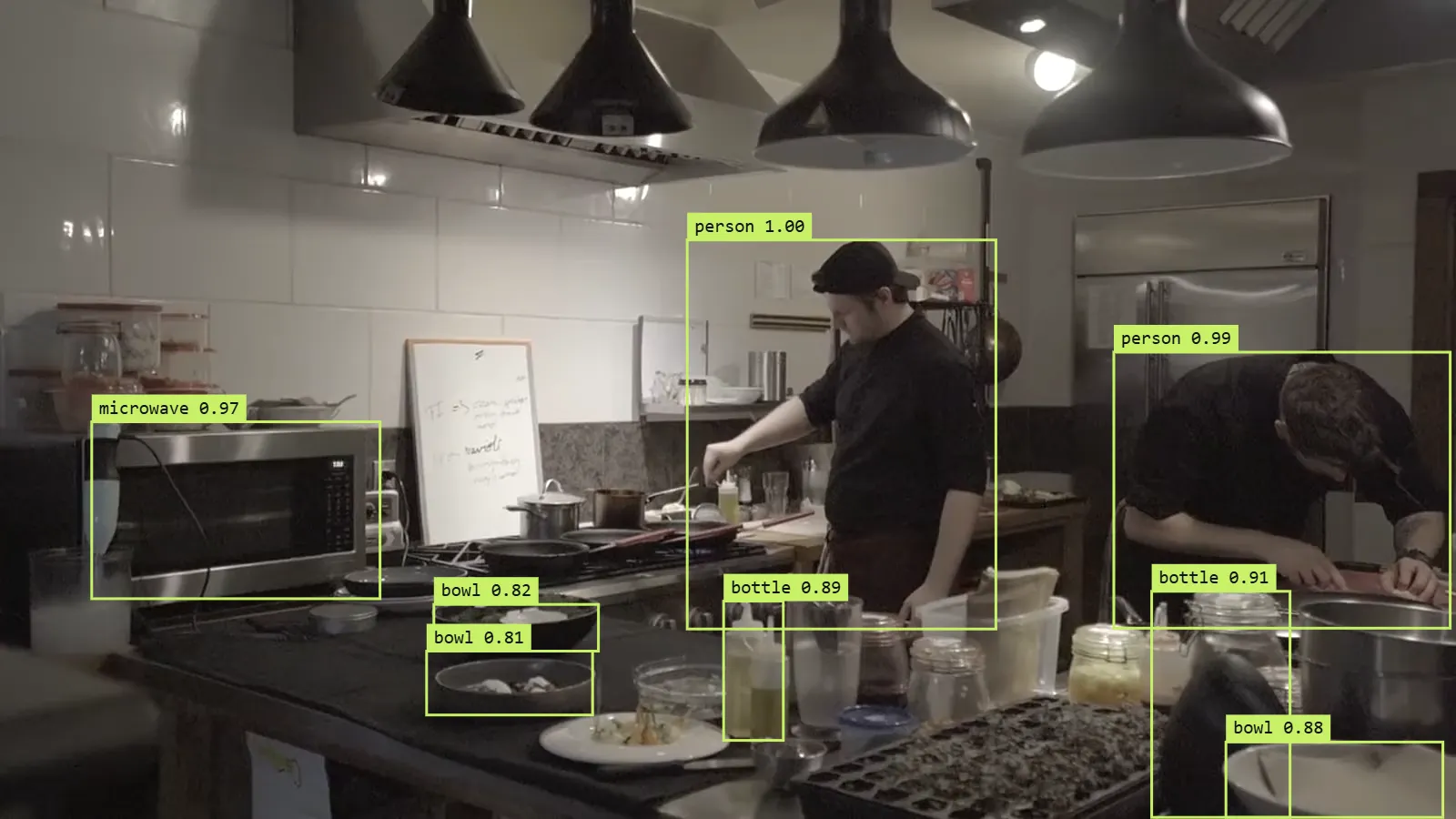
In the kitchen, for example, it finds the two people with a confidence of 1.00 and 0.99, the microwave, the bottles and the bowls on the counter. Those are the boxes in the image above, exactly as the model returned them.
Before publishing them I applied three filters:
- Minimum confidence of 0.7 and at most eight boxes per frame, so the image stays readable.
- Impossible classes removed. An aeroplane, a pair of skis or a banana cannot appear in these shots; if the model sees one, it is a mistake, and a mistake on the home page looks like a bug in the website.
- No boxes on the echocardiogram. COCO knows nothing about anatomy: in that shot the only thing it found was the keyboard. Better to show nothing than to show something irrelevant.
What the model gets wrong
The aerial shot of the intersection is the hardest. COCO is made of photos taken at street level; from a drone, a car or a person has a different shape, and the model hesitates. In some frames it even marks a patch of courtyard as a person. It is a good reminder of something I repeat in every project: a model is only as good as the similarity between its training data and what you show it afterwards.
What is computed in your browser
The contour lines moving over the image are computed live: the page reads the brightness of the video on a grid of 96 by 54 points and draws four levels with the marching squares algorithm. It is cheap, needs no model and works on any device.
The interface layers floating in front (a vegetation index in the field, an ejection fraction in health…) are examples of how a system like this would look in each sector, and on the page they carry the label "Example". The only thing that comes from a real model is the boxes.
How it is served
A six-megabyte video should not slow down a home page:
- No autoplay or preloading. If you have data saver turned on or prefer reduced motion, you only see a still image.
- Two sizes. On mobile a 1280×720 version of under 2 MB is downloaded; the browser only fetches one of the two.
- Outside the repository. The videos are published separately with a name that changes with their content, so they can be cached forever without any risk of serving an old version.
Why I am telling you this
Because it is the same question you should ask about any AI demo: which part is a model, which part is precomputed and which part is design. In the Lab you can try a similar detector with your own camera, and there everything runs live.